The National Testing Agency (NTA) made the JEE Main 2027 application form available online at jeemain.nta.nic.in. Candidates can complete their Session 1 registration through the official portal, provided they satisfy the Class 12 eligibility and passing year requirements (passing in 2025, 2026, or appearing in 2027). Be sure to review the complete schedule, category rules, and required documentation—such as academic marksheets, ID proof, and scanned photos/signatures—before applying.
The National Testing Agency (NTA) has officially released the JEE Main 2027 Session 1 application form on its official portal, jeemain.nta.nic.in, with the registration window open until November 22, 2026 (11:50 PM). Candidates who passed their Class 12 board examination in 2025 or 2026, as well as those appearing for their final exams in 2027, are eligible to apply. To complete the registration process, applicants must submit their academic details, verify their identity via Aadhaar, DigiLocker, or an alternate valid government ID, upload recent passport-size photographs and signatures (along with relevant category or PwD/UDID certificates, if applicable), and pay the requisite examination fee online.

JEE Main 2027 Application Process & Registration Fee Structure
The JEE Main 2027 application process involves four sequential stages: online registration and portal login, completing the detailed application form, uploading mandatory documents (recent passport-size photograph, candidate signature, and relevant Category/PwD certificates), and paying the examination fee online. Qualifying JEE Main is mandatory for admission to undergraduate engineering, architecture, and planning programs (B.E./B.Tech, B.Arch, and B.Planning) across NITs, IIITs, CFTIs, and top participating engineering colleges nationwide.
Application Fee Details per Session (Centres in India – Single Paper):
-
General (Male): INR1,000
-
Gen-EWS / OBC-NCL (Male): INR 900
-
General / Gen-EWS / OBC-NCL (Female): INR 800
-
SC / ST / PwD / Third Gender Candidates: INR 500
(Note: Candidates choosing examination centres outside India or appearing for multiple papers, such as B.E./B.Tech along with B.Arch/B.Planning, are subject to higher category-wise slab rates.)
JEE Main 2027 Application Form: Key Highlights
| Particulars | Details |
| Exam Name (Full Form) | Joint Entrance Examination (Main) – JEE (Main) 2027 |
| Conducting Body | National Testing Agency (NTA) |
| Exam Level | National-Level Undergraduate Entrance Exam |
| Frequency of Conduct | Twice a year (Session 1: January 2027 & Session 2: April 2027) |
| Mode of Application | Online Only (at jeemain.nta.nic.in) |
| Session 1 Registration Window | October 24, 2026 to November 22, 2026 (up to 11:50 PM) |
| Session 1 Late Fee Window | November 23 to November 26, 2026 (up to 11:50 PM; Late fee: INR 500) |
| Session 1 Correction Window | November 27 to November 29, 2026 (up to 11:50 PM) |
| Advance Exam City Intimation | December 30, 2026 |
| Session 1 Admit Card Release | January 13, 2027 |
| Session 1 Examination Dates | January 20, 21, 22, 23, 24, and 28, 2027 |
| Session 2 Registration Window | To be notified separately prior to April 2027 session |
| Mode of Examination |
• Paper 1 (B.E./B.Tech): Computer Based Test (CBT) only • Paper 2A (B.Arch): CBT (Maths & Aptitude) + Pen-and-Paper (Drawing) • Paper 2B (B.Planning): Computer Based Test (CBT) only |
| Medium of Exam | 13 languages (English, Hindi, Assamese, Bengali, Gujarati, Kannada, Malayalam, Marathi, Odia, Punjabi, Tamil, Telugu, and Urdu) |
| Application Fee (Single Paper – India) |
• General (Male): INR 1,000 • Gen-EWS / OBC-NCL (Male): INR 900 • General / Gen-EWS / OBC-NCL (Female): INR 800 • SC / ST / PwD / Third Gender: INR 500 |
| Application Fee (Both Papers – India) |
• General / Gen-EWS / OBC-NCL (Male): INR 2,000 • General / Gen-EWS / OBC-NCL (Female): INR 1,600 • SC / ST / PwD / Third Gender: INR 1,000 |
| Official Website & Portals | jeemain.nta.nic.in / nta.ac.in |
Recommended: Download JEE Main previous year question papers pdf
How to fill JEE Main 2027 Session 1 application form
The National Testing Agency (NTA) is set to release the online application form for JEE Main 2027 Session 1 in October 2026. Applicants must submit their forms exclusively online through the official portal, as physical or hard copies will not be accepted under any circumstances. Below is the step-by-step procedure to complete the Session 1 registration.
JEE Main 2027 Session 1 application form:
-
Visit the Official Portal: Go to the official NTA website (
jeemain.nta.nic.in). -
Start Registration: Click on the "JEE Main 2027 Registration" link on the home page.
-
Select Login/ID Method: Choose your preferred mode of identification and login method to create a new account.
-
Enter Basic Details: Fill in your basic information, including your full name, mobile number, and email address.
-
Save Login Credentials: Once registered, save your generated Application Number and Password.
-
Fill out the Application Form: Log in and complete your personal, educational, disability, and identity details.
-
Complete Live Photo Capture: Complete the live photo capture process required in the form.
-
Upload Required Documents: Upload clear scanned copies of your photograph, signature, identity proof, and disability certificate (if applicable).
-
Pay the Application Fee: Complete the payment online using the available payment modes.
-
Download Confirmation: Save and download the final confirmation page for your future reference.
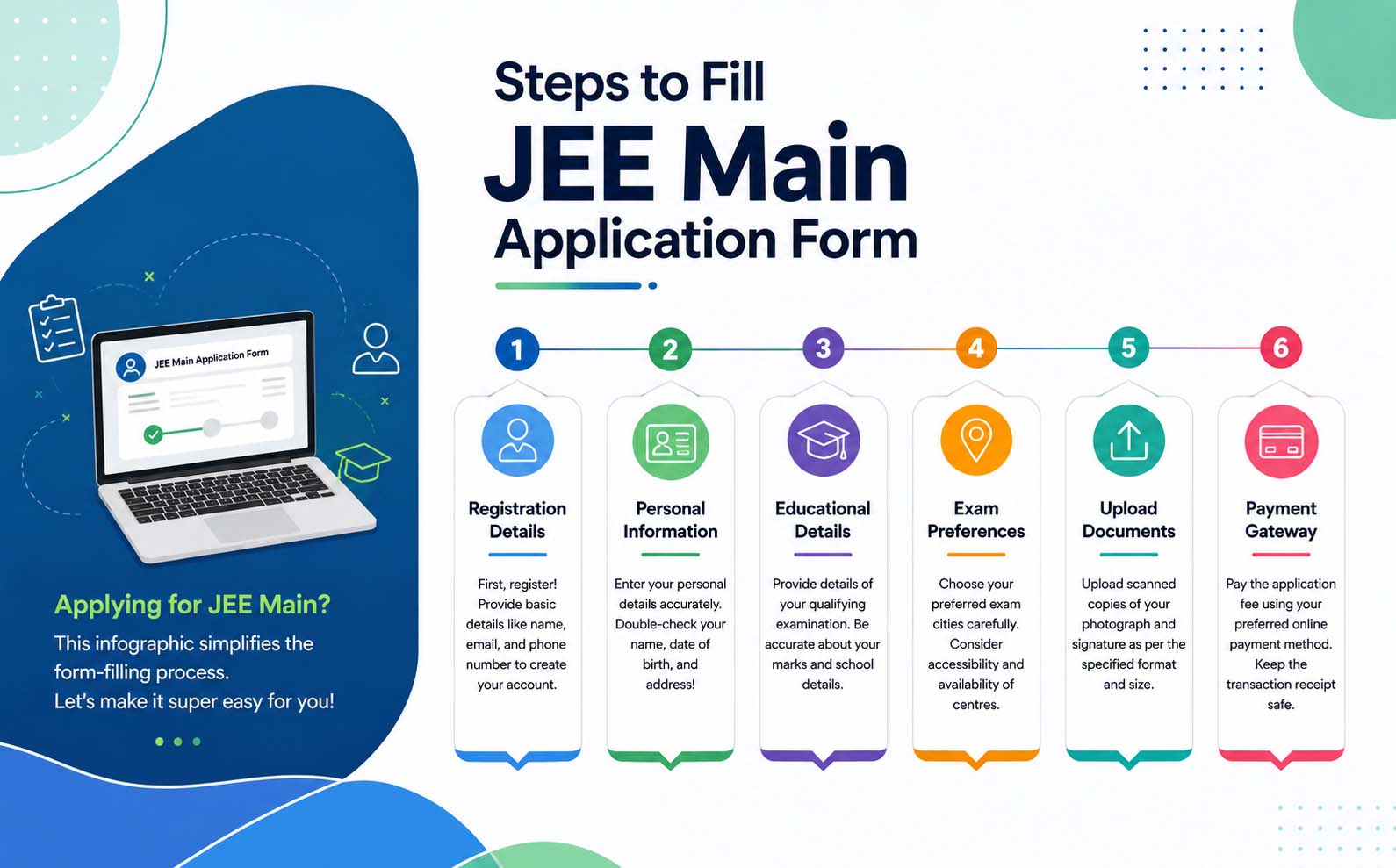
JEE Main 2027 Application Process:- Detailed Information
The National Testing Agency (NTA) will release the JEE Main 2027 Session 1 application form tentatively in October/November. Eligible candidates can register online at the official portal: jeemain.nta.nic.in. Along with basic personal and academic details, candidates must complete specific requirements such as entering their APAAR ID, disability details, and completing a real-time live photograph capture. An online application correction window will also be provided after the registration closes.
Step 1- JEE Mains 2027 Registration
It is the first step in filling out the JEE Mains application form. Read the steps below to fill out the JEE Mains application form 2027:
- Click on the jeemain.nta.nic.in 2027, the registration link
- Click on the JEE Main 2027 registration

- The JEE login page will appear
- There are three simple steps to apply online: registration, filling out the online application form, and submitting the document.
- Click on the ‘New Registration’ button, provided in the middle section.
- Instructions and Procedure for online submission of the application form page will be displayed.
- Go through the complete instructions carefully and then select the declaration
- Click on the “click here to proceed” button

- The JEE Main 2026 registration form will appear.
- Provide personal details, present and permanent address
- Choose a password, and enter the security pin
- Click on the option for new candidate registration.
- Read the application instructions carefully.
- A preview of the JEE 2027 registration form will appear.
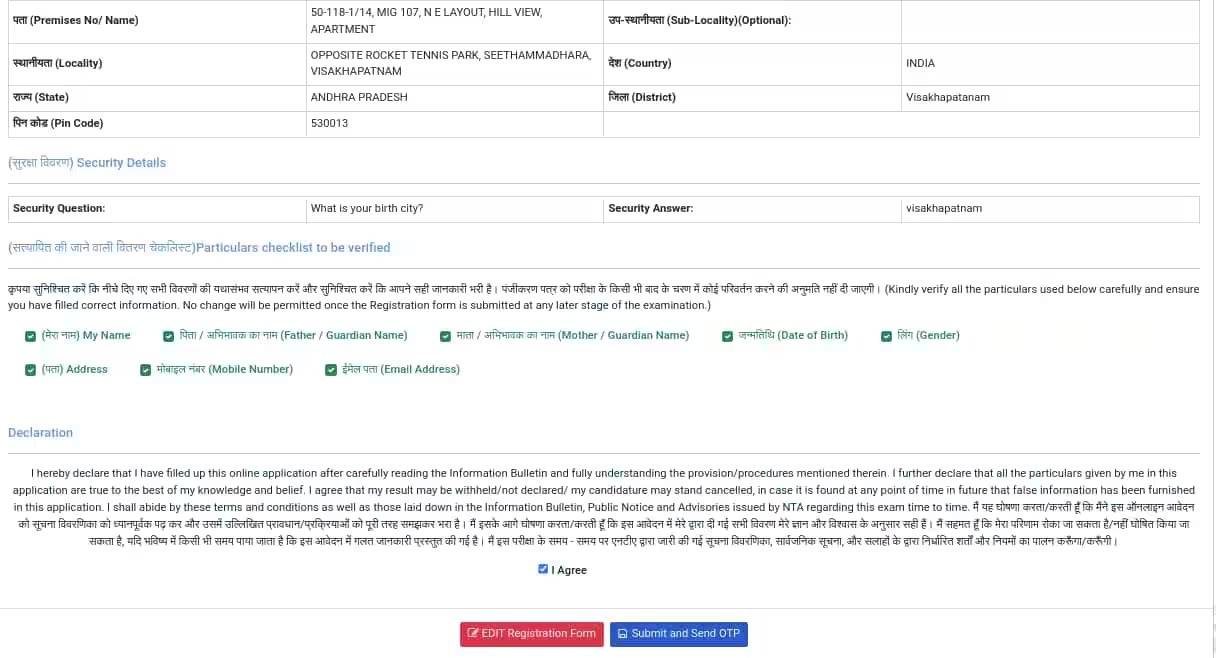
- Accept the declaration and proceed.
- Select the appropriate identity-verification method.
- Enter the candidate’s name, date of birth, gender and contact details.
- Provide a valid mobile number and email address.
- Create a secure password and select a security question.
- Verify the registered mobile number and email through OTP.
- Submit the registration form.
After successful registration, the system generated a unique JEE Main application number. Candidates had to preserve this number because it was required for completing the form, downloading the admit card, accessing the answer key and checking the result. The same application number was used for both JEE Main 2026 sessions.
Candidates were not permitted to submit more than one application form. Multiple application numbers belonging to the same candidate could result in action under the Unfair Means provisions.
Step 2: Fill in the JEE Main 2027 Application Form
Once initial registration is complete, candidates can log in to the portal using the Application Number and Password sent to their registered email ID and mobile number to complete the detailed form.
Information Required in the Detailed Application Form
-
Personal & Demographic Details: Country of residence, state of eligibility/residence, category (General/OBC-NCL/SC/ST/EWS), and diabetic status.
-
Academic Background: Medium of instruction in Classes 11 and 12, along with detailed marks/grades for Class 10 and Class 12 (or equivalent).
-
Exam Preferences: Choice of paper (Paper 1 - B.E./B.Tech, Paper 2A - B.Arch, Paper 2B - B.Planning, or a combination) and preferred question paper medium.
-
Exam Centre Selection: Four preferred exam city choices in order of priority.
After verifying all entered information, submit the section to proceed directly to the Live Photo Capture & Document Upload stage.
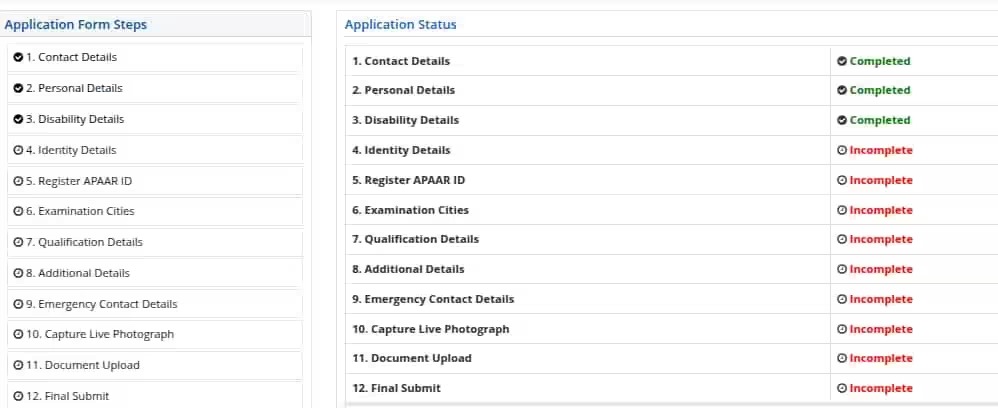
Step 3 - Capturing a live photograph for JEE Mains registration
Candidates need to click a live photo after filling all the previous sections. This is a mandatory section, in which aspirants can use an in-built camera or an external device like a mobile phone to click their real-time picture.
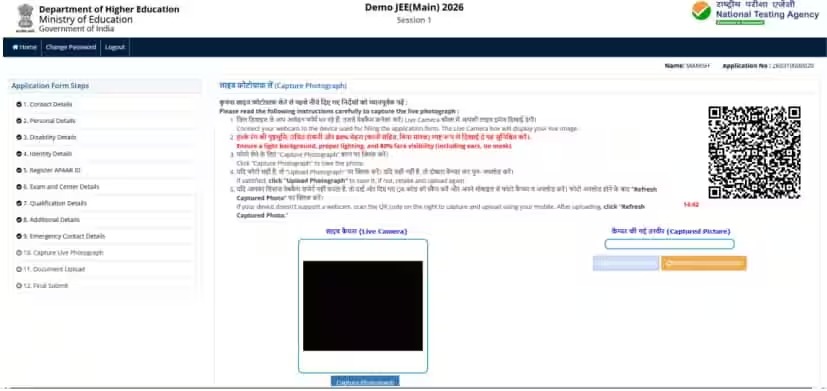
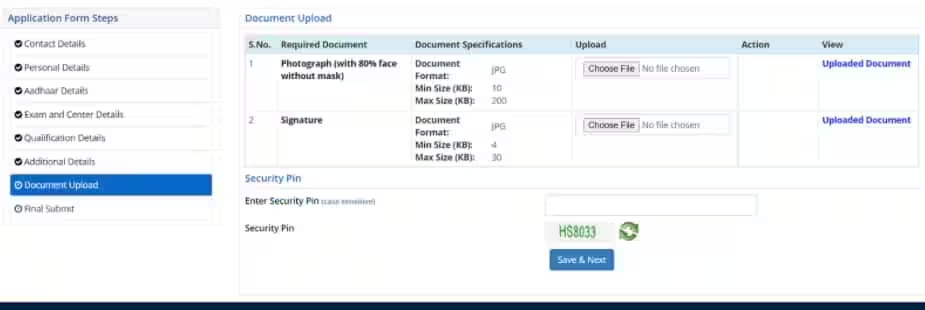
Step 4 -Uploading Scanned Images in JEE Main Application Form 2027
Candidates have to upload the scanned image of their passport-size coloured photograph and signature in the JEE Main 2026. The size and file format of images should be strictly adhered to as per the NTA JEE Main photo and signature guidelines
Step 5: Pay the JEE Main 2027 Application Fee
After completing the application form and uploading the required images, candidates will be taken to the payment page.
The application fee will be shown according to the candidate’s category and gender. The fee can be paid online using a credit card, debit card, net banking or another available payment option.
After successful payment, a confirmation message will be sent to the candidate’s registered mobile number
NTA JEE Mains 2027 Registration Fees (For Indian Exam Centres)
| Category | BE./BTech or BArch or B.Planning | BE./BTech & BArch or BE./BTech & BPlanning or BE./BTech, BArch & BPlanning or BArch & BPlanning |
|---|---|---|
| General | For Males- Rs 1000 For Females- Rs 800 |
For Males- Rs 2000 For Females- Rs 1600 |
| EWS/OBC-NCL | For Males- Rs 900 For Females- Rs 800 |
For Males- Rs 2000 For Females- Rs 1600 |
| SC/ST/PWD/Transgender | For All- Rs 500 | For All- Rs 1000 |
NTA JEE Mains 2027 Registration Fees (For Abroad Exam Centres)
| Category | BE./BTech or BArch or B.Planning | BE./BTech & BArch or BE./BTech & BPlanning or BE./BTech, BArch & BPlanning or BArch & BPlanning |
|---|---|---|
| General | For Males- Rs 5000 For Females- Rs 4000 |
For Males- Rs 2000 For Females- Rs 1600 |
| EWS/OBC-NCL | For Males- Rs 4500 For Females- Rs 4000 |
For Males- Rs 2000 For Females- Rs 1600 |
| SC/ST/PWD/Transgender | M/F- Rs 2500 Transgender-Rs 3000 |
For All- Rs 5000 |
JEE Main 2027: NTA Addresses Aadhaar Name Mismatch for JEE Mains Applications
If candidates encounter a name-mismatch message during Aadhaar authentication, they will be provided an option to correct the error. Such a provision was provided in the previous year as well.
JEE Main Correction Window 2027
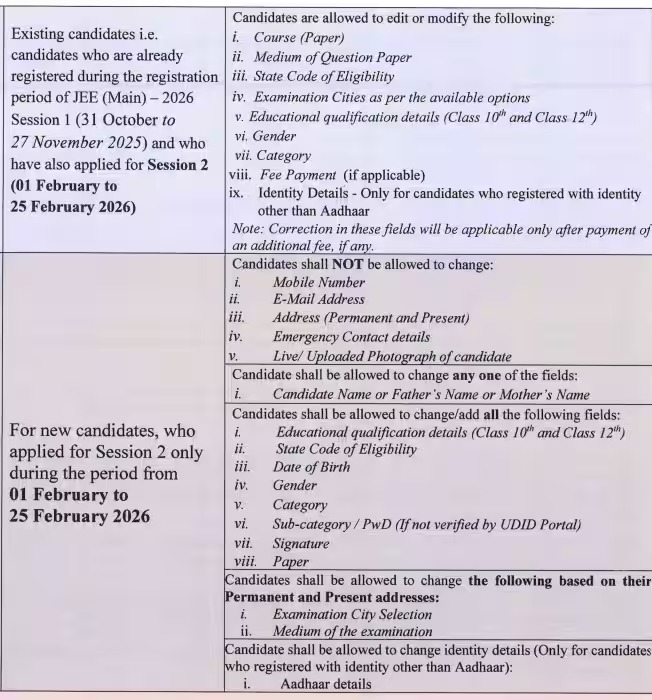
The National Testing Agency will announce the JEE Main 2027 application form correction date on the official website. The JEE Main form correction was available online. Students who entered any incorrect information in their application form or candidates with defects in uploaded images can make edits till the last date.
Applicants require their log-in to access the JEE application form 2027 correction facility. Candidates need to pay an additional fee for modifying the details, while some details will be allowed for modification without any cost. Information that can be modified is as follows:
- Personal Details: Spelling mistakes in name, parent’s name, etc. can be corrected.
- Academic Details: School details, year of passing, and qualifying exam can be corrected in this section.
- Change of Paper: The choice of paper can be changed from Paper 1 to Paper 2 as well as from Paper 2 to Paper 1. If candidates have applied for one paper and wish to apply for both papers, they can do so on payment of the balance fee.
- Exam Centres: Candidates will not be able to change their choice of exam centres.
- Language of Examination: The language can be changed from English to Hindi/Gujarati and vice versa.
- Name, State of Eligibility, and Date of Birth: These details can also be corrected by candidates.
- Category: Candidates can also change their category. If candidates change their category from General to Reserved, the fee will not be refunded. If candidates change their category from Reserved to General, they will have to pay the balance fee.
JEE Main 2027 Application Form details
What to do after filling the JEE Main Application Form 2027?
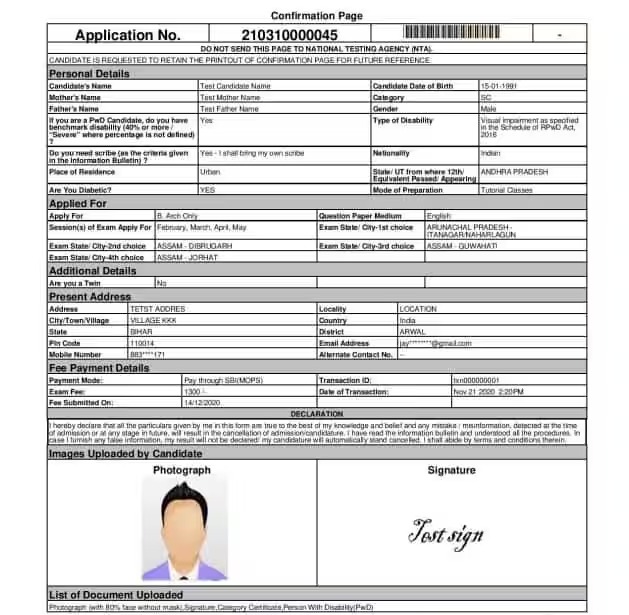
After submitting the registration form for JEE Main 2027, candidates have to download a copy of the application for future use. Candidates will not be able to change their allotted JEE Main 2027 exam centre.Candidates whose application form for JEE Main 2027 is submitted correctly can download the admit card at the official website- jeemain.nta.nic.in.
How to Check Your JEE Main 2027 Application Form Status Online
Once you submit your JEE Main 2027 application form, the National Testing Agency (NTA) sends an official confirmation message to your registered email ID and mobile number. However, candidates can also verify their application status online directly through the official NTA portal.
Follow these simple steps to check your JEE Main registration and fee payment status:
-
Visit the NTA Portal: Go to the official website (
jeemain.nta.nic.in). -
Access Candidate Login: Click on the JEE Main 2027 Login link.
-
Enter Credentials: Log in using your registered Application Number and Password.
-
View Application Dashboard: Once logged in, your complete application status—including registration completion, form submission, and fee payment confirmation—will be displayed on the screen.
Documents Required for JEE Main 2027 Registration: Complete Checklist
To ensure a smooth and hassle-free application process, candidates must keep all essential documents and details ready before starting the online application. Below is the updated list of required documents and details for JEE Main 2027:
-
Valid Contact Details: An active email address and mobile number to receive official updates and communications from NTA.
-
Class 10 Certificate: Scanned copy/details of the Class 10 certificate (Class 12 certificate upload is not required).
-
Identity Proof: Valid identity details (such as identity proof or official identification).
-
Scanned Photograph & Signature: Clear, high-quality scanned files of your recent photo and signature as per NTA specifications.
-
Category Certificate Details (OBC-NCL / EWS): Only the certificate details need to be entered; uploading the physical document is not required.
Additional Requirements for PwD / PwBD Candidates
Candidates applying under the Persons with Benchmark Disabilities (PwD/PwBD) category must meet the following criteria:
-
Minimum Benchmark: A minimum of 40% disability is mandatory for reservation benefits.
-
Authorized Medical Certificate: The PwD/PwBD certificate must be issued in the official Government of India format by an authorized government hospital or medical authority. It must clearly state the disability type, percentage, and validity.
-
Upload Format: The certificate must be uploaded in PDF format during the online application process.
-
Exam Center Verification: Candidates must carry the original physical certificate to the exam center on the day of the test for verification.
JEE Main 2027 Photograph & Signature Dimension and Specification
Candidates can check the dimensions and specifications of the JEE Main 2027 documents in the table:
| Particular | Dimensions | Size | Format |
| Photograph | 3.5 cm × 4.5 cm | 10 KB to 200 KB | JPEG / JPG |
| Signature | 3.5 cm × 1.5 cm | 10 KB to 100 KB | JPEG / JPG |
| Class 10 Certificate or Equivalent | N/A | 50 KB to 300 KB | |
| UDID / PwD Certificate (if applicable) | N/A | 50 KB to 300 KB | |
| Identity Proof | N/A | 10 KB to 200 KB | JPEG / JPG |
JEE Main 2027 Document Upload Guidelines & Common Form-Filling Mistakes to Avoid
Successfully submitting your JEE Main 2027 application requires strictly following the National Testing Agency (NTA) specifications for document uploads. Even minor errors in your photograph or signature can lead to form rejection.
Essential Guidelines for JEE Main 2027 Image & Document Uploads
-
Photograph Specifications: Candidates can upload either a color or clear black-and-white photograph. Normal prescription spectacles are permitted, but sunglasses, caps, or headgear (except religious wear) are strictly prohibited. The face must be clearly visible.
-
Image Clarity: Blurred, shadowy, or pixelated photographs will be rejected. Ensure your image meets NTA’s exact resolution and file size guidelines before uploading.
-
Signature Guidelines: Sign clearly with a black or blue pen on plain white paper. Scanned signatures must match NTA's specified dimensions and file formats.
-
Document Formats: Upload all certificates and documents strictly within the prescribed file size (KB/MB) and format (JPEG/PDF) set by the NTA.
7 Common Mistakes to Avoid When Filling the JEE Main Application Form
-
Ignoring Eligibility Criteria: Not verifying age limits, qualifying year, or subject requirements beforehand.
-
Entering Incorrect Personal Details: Making typos in your name, parents' names, date of birth, or identity details.
-
Selecting Wrong Exam Cities: Picking inconvenient test centers or making errors in city preferences.
-
Improper Document Uploads: Uploading unreadable scans, incorrect file types, or wrong document dimensions.
-
Selecting the Wrong Category: Choosing incorrect category options (General, OBC-NCL, EWS, SC, ST) without matching valid documentation.
-
Overlooking Exam Pattern & Medium: Selecting the wrong paper (Paper 1 vs. Paper 2) or exam language (English, Hindi, Regional).
-
Incomplete Fee Payment: Failing to complete the online transaction or not saving the final payment receipt.
JEE Main 2027 Registration: Key Changes & Updated Guidelines by NTA
The National Testing Agency (NTA) has introduced several key updates to the JEE Main 2027 registration process to streamline applications and prevent fraud. Engineering aspirants must familiarize themselves with these major changes before filling out the application form:
-
Aadhaar e-KYC Integration: Personal details will now be automatically fetched via UIDAI e-KYC. Candidates must ensure that their Aadhaar details strictly match their official school records. Note: Exam city allocation may be linked to your registered Aadhaar address.
-
Mandatory Live Photo Capture: As an anti-cheating measure, candidates must capture a live photo using a webcam or front camera during online registration in addition to uploading scanned images.
-
Scanned Identity Proof Upload: Applicants must upload a clear scanned copy of a valid government ID (such as an identity card or passport).
-
Mandatory UDID Card for PwD Candidates: Persons with Benchmark Disabilities (PwD) must upload a valid UDID card along with an updated medical certificate. Candidates are advised to arrange these documents early to avoid portal delay issues.
-
Class 11 Registration Number Required: Candidates must enter their Class 11 school registration number during form filling to ensure seamless cross-verification with educational boards.
-
Updated Application Fee Structure: The revised category-wise fee structure (for a single paper in India) is:
-
General (Male): INR 1,000 | General (Female): INR 800
-
OBC-NCL / EWS (Male): INR 900 | OBC-NCL / EWS (Female): INR 800
-
SC / ST / PwD / Third Gender: INR 500
-
-
Expansion of Examination Cities: NTA has added 33 new test cities to improve candidate convenience. Applicants can select up to 4 preferred exam cities.
-
New Form Sections (APAAR ID & Disability Details): The application form now includes dedicated fields for APAAR ID (Automated Permanent Academic Account Registry) and detailed disability disclosures. Ensure these fields are filled accurately, as editing options during the correction window may be restricted.
How to Recover a Forgotten JEE Main 2027 Password
If you forget your password, you can easily reset it using these steps:
-
Visit the Official Site: Go to
jeemain.nta.nic.in. -
Open Candidate Login: Click on the Candidate Login link.
-
Select Forgot Password: Click on the "Forgot Password?" link.
-
Enter Your Details: Type in your Application Number and Date of Birth.
-
Get Your Password: A password reset link or new password will be sent to your registered email address and mobile number.
How to Find Your Lost JEE Main 2027 Application Number
If you misplaced your application number, try these solutions:
-
Check Your Messages & Email: Search your SMS inbox and registered email account for the original confirmation message sent by NTA.
-
Check Downloaded Documents: Open your saved PDF copy of the JEE Main 2027 Application Form or Confirmation Page, as the application number is printed at the top.
-
Contact the NTA Helpdesk: If you still cannot locate it, call the official NTA helpline or send them an email describing your issue to get assistance.
JEE Main 2027 Application Form: Troubleshooting Common Issues & Important Rules
While applying online for JEE Main 2027, candidates often run into technical glitches related to image uploads, fee processing, or form submission. Understanding how to resolve these common issues quickly ensures a smooth registration process.
Quick Solutions for Common JEE Main Application Problems
-
Image & Document Upload Errors:
-
Cause: Photos, signatures, or certificates fail to upload if they do not match NTA's exact file size (KB/MB) and format (JPEG/PDF) specifications.
-
Fix: Resize and reformat your files before starting the application. You can use free online image resizers or visit a local cyber café to adjust document dimensions accurately.
-
-
Payment Failures & Double Deductions:
-
Cause: Network timeouts or gateway delay may result in money being debited from your bank account while the portal still shows "Payment Pending."
-
Fix: Do not panic or pay multiple times immediately. Allow some time for the system to sync, and if the issue persists, contact the official NTA helpdesk with your transaction details for assistance.
-
Six Crucial Rules to Remember Before Submitting Your Form
-
Session 2 Registration for Existing Candidates: If you successfully register and pay for Session 1, you do not need to create a new registration for Session 2. You will simply log in, pay the required fee, and select your exam preferences.
-
Avoid Last-Minute Rush: Complete and submit your application well before the official deadline to avoid heavy website traffic and server slow-downs.
-
Read the Official Brochure Carefully: Review all eligibility criteria, guidelines, and document requirements in the NTA Information Bulletin before filling out details.
-
Ensure 100% Accurate Information: Providing misleading or incorrect personal, academic, or category details will lead to immediate rejection of your application form.
-
Download & Save the Confirmation Page: Once your form and fee payment are submitted, save and print the final confirmation page. Keep it safe until the end of the admission and counseling process.
-
Verify File Formats in Advance: Ensure every scanned document strictly aligns with NTA’s prescribed format, dimensions, and clarity guidelines prior to final submission.
How many students appeared for JEE Mains 2027?
NTA will release the final student attendance and registration numbers for JEE Main 2027 on the official website together with the exam results. Check the past years' candidate statistics below for reference.
| Year | Examination Session | Candidates Registered | Candidates Appeared |
| 2026 | January | 13,55,293 | 13,04,653 |
| April | 11,10,904 | 10,34,330 | |
| 2025 | January | 13,11,544 | 12,58,136 |
| April | 10,61,840 | 9,92,350 | |
| 2024 | January | 12,21,624 | 11,70,048 |
| April | 11,79,569 | 10,67,959 | |
| 2023 | January | 8,60,064 | 8,23,967 |
| April | 9,31,334 | 8,83,367 | |
| 2022 | June | 8,72,970 | 7,69,604 |
| July | 6,22,034 | 5,40,242 | |
| 2021 |
Four sessions: February, March, July and August/September |
10,48,012 (unique candidates) |
9,39,008 (unique candidates) |
| 2020 | January | 9,21,261 | 8,69,010 |
| September* | 8.41 lakh | 6.35 lakh | |
| 2019 | January | 9,29,198 | 8,74,469 |
| April | 9,35,755 | 8,81,096 |
JEE Main 2027 Application Helpline
Students who face problems while filling out the JEE Main application form can contact the National Testing Agency at the below-
mentioned address
National Testing Agency
Block C-20 1A/8 ,Sector- 62
IITK Outreach Centre, Gautam Buddh Nagar
Noida-201309, Uttar Pradesh (India)
Contact No: 0120 -6895200
Frequently Asked Questions (FAQs)
Candidates must have a scanned photograph, signature, Class 10 certificate, identity proof, and PwD/UDID certificate (if applicable).
No, only the Class 10 certificate needs to be uploaded; Class 12 marksheet details are required, but document upload is not.
Log into the official portal (jeemain.nta.nic.in) using your application number and password to view your form and payment status.
No, the National Testing Agency (NTA) does not allow any changes to the selected exam centers during the application correction period.
Allow some time for system synchronization, and if the status remains unupdated, contact the official NTA helpdesk before attempting a retry.